Golden Dragon game guide: how to play at Automated Golden Dragon
Automated Golden Dragon is a Golden Dragon-style lobby of slot games, fish tables and keno. This guide covers your two balances, how each kind of game works, the AUTO button, jackpots and the free entries you can collect.
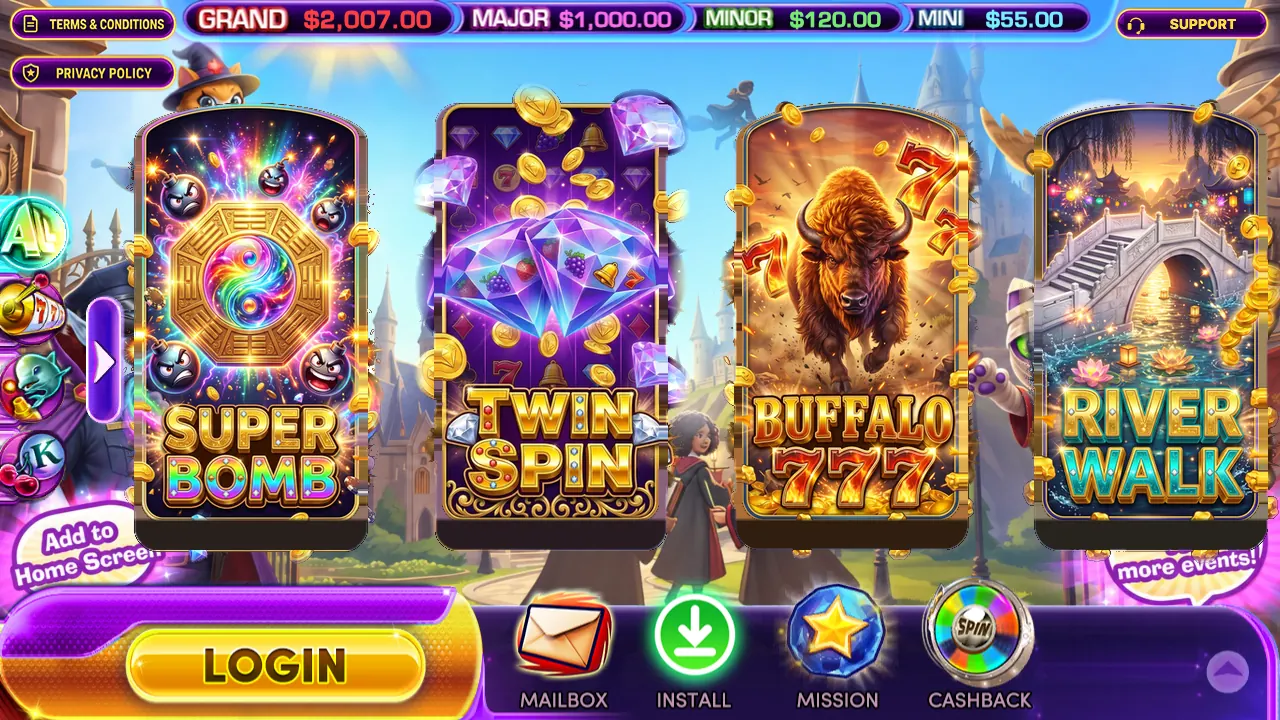
1. Entries and Winning
You have two balances. Entries are what you play with: purchases, the first-purchase match and free rewards go there. Winning is where game wins collect, and it is what you can redeem. 100 entries are worth $1. Slot spins are paid from Entries; fish and keno bets use Entries first and then Winning. When Entries run low, you can move Winning into Entries (section 8).
2. Pick a game
The tabs on the left of the lobby sort the games: ALL, SLOT (59 slot games such as Super Bomb, Twin Spin, Buffalo 777, River Walk, Cash Spin, Lion Dance, Safari Heat and Thunder Zeus), FISH (9 fish shooting games) and OTHERS (2 keno games). Tap a game to open it; the lobby button in the game brings you back.
3. Slot games
The slots range from 777-style classics such as Buffalo 777, Lucky 777, Triple 7 and Hot 7s to feature-packed video slots. (Golden Dragon 777 is the name of a different website; these are this lobby's own 777-themed slots.)
- Set your bet with the + and - buttons, then press spin.
- AUTO keeps spinning at the same bet until you press it again or your balance runs out.
- The game shows your ENTRIES and WINNING; wins go to WINNING.
4. Fish games
- Tap or hold where you want to shoot. Each shot costs the bet shown at the bottom; change it with + and -.
- Bigger and rarer targets pay more when they are caught. AUTO keeps shooting for you.
- The box at the bottom left shows your ENTRIES and WINNING while you play.
5. Keno
Choose your numbers and your bet, then play the draw. Matches pay according to the game's pay table.
6. Jackpots
The GRAND, MAJOR, MINOR and MINI amounts at the top of the lobby are live jackpot pools.
7. Free entries and rewards
- DAILY FREE: collect free entries once every 24 hours.
- MISSION: small daily goals, such as checking in or spinning a number of times, that pay entries.
- CASHBACK: part of what you lost comes back as entries.
- REFERRAL: you and a friend you invite both get entries.
- MAILBOX: messages from the site, sometimes with rewards.
Free entries wait while your balance is $1 or more and are added once it is lower. Free play alone cannot be redeemed.
8. Move Winning into Entries
Tap the + next to your ENTRIES (in your profile or in a slot game) and choose an amount ($1, $5, $10, $20, $100 or All) to move that much of your Winning into Entries and keep playing.
9. Buying and redeeming
BUY opens the packages; payment happens on a secure checkout page and your entries are added automatically (how that works). REDEEM sends a request to pay out your Winning; it is reviewed before it is paid. The full rules, including minimums and limits, are in the Terms & Conditions and under HOW IT WORKS in the BUY and REDEEM windows.